Declarative Hooks
In this section, you will learn what Declarative Hooks are, how to define them, and how to use conditional execution.
About Declarative Hooks
Declarative Hooks define actions to be executed at specific moments during a Plugin application.
Usage in Infrastructure Plugins
Yes, you can use Declarative Hooks in Infrastructure Plugins. However, they execute only when the Plugin is applied, not during the infrastructure deployment process.
When you create an Infrastructure and deploy it via the StackSpot Portal, the system runs the stk apply plugin command followed by stk apply plugin deploy transparently. Hooks run only during the first step.
Execution time in StackSpot
Declarative Hooks run when the Plugin is applied to an Application or Infrastructure.
- Application Creation: Deployment has not happened yet. Declarative Hooks run normally to configure the project.
stk deploy appCommand: At this stage, the Plugin is already applied and is used only to generate Terraform files. Declarative Hooks do not execute in this step, as they only run during creation.
The Plugin application process has two main phases:
- Phase 1: Collect input parameters from the user.
- Phase 2: Interpolate Jinja templates using the provided values to generate files.
You can configure Hooks to execute actions at three distinct moments:
before-input: Before asking for input parameters.before-render: Before interpolating Jinja templates to generate files.after-render: After file generation.
The following image illustrates the Templates and Plugins rendering cycle:
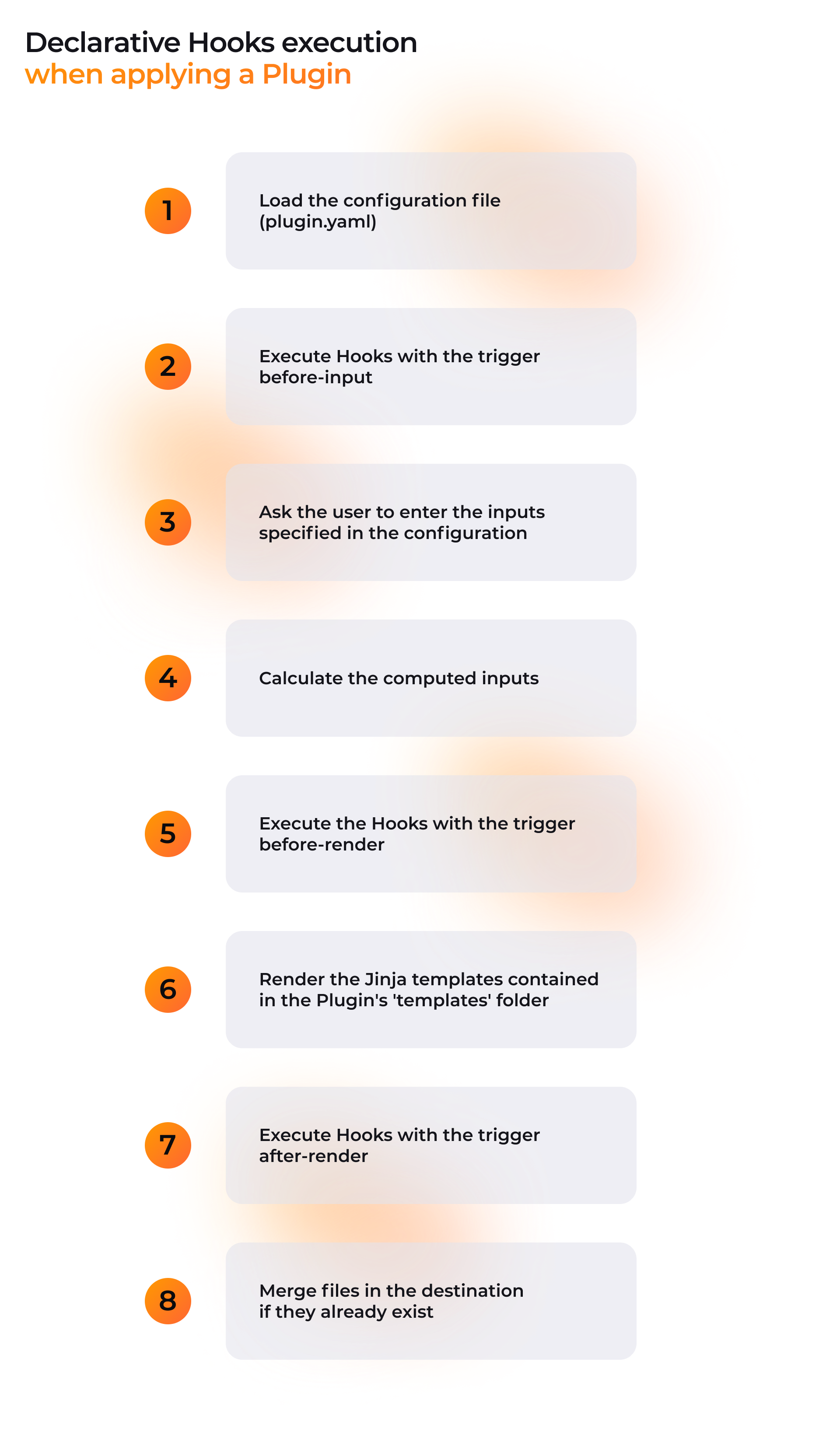
Flow details:
- Loads the configuration file (
plugin.yaml); - Executes Hooks with
before-inputtrigger; - Requests inputs defined in the configuration from the user;
- Calculates
computed-inputs; - Executes Hooks with
before-rendertrigger; - Renders Jinja templates (Plugin's
templatesfolder); - Executes Hooks with
after-rendertrigger; - Merges files if they exist in the destination.
The parameters entered by the user in step 3 are treated as variables. You can use them in Jinja expressions for file generation templates and specific Plugin configurations.
How to define a Declarative Hook
You must define Declarative Hooks in the plugin.yaml configuration file.
Check out a configuration example:
schema-version: v4
kind: plugin
metadata:
  name: Declarative Hooks Plugin example
  display-name: Declarative Hooks Plugin example
  description: My Plugin with Declarative Hooks
  version: 3.0.0
spec:
  type: app
  compatibility:
    - python
  docs:
    pt-br: docs/pt-br/docs.md
    en-us: docs/en-us/docs.md
  technologies: # Ref: https://docs.stackspot.com/create-use/create-content/yaml-files/plugin-yaml/#technologies-1?utm_source=stackspot
    - React
    - Web
    - JavaScript
  hooks:
    - type: run
      trigger: before-input
      working-dir: "{{project_name}}"
      commands:
        - echo plugin-python before-input!
    - type: run-script
      trigger: before-render
      script: script.py
    - type: edit
      trigger: after-render
      path: src/some-file.txt
      changes:
        - insert:
            line: 0
            value: "# Text inserted in first line\n\n"
            when:
              not-exists: "# Text inserted in first line"
        - search:
            string: "# Text inserted in first line"
            insert-before:
              snippet: snippets/insert-before-first-line.txt
            when:
              not-exists: "# Text inserted before first line"
        - search:
            pattern: (Text )inserted in( first line)
            replace-by:
              value: \1moved from\2
            when:
              not-exists: print(f"Hello {name}!")
    - type: render-templates
      trigger: after-render
      path: templates-java
      condition:
        variable: language
        operator: "=="
        value: java
You can define multiple hooks within a single Plugin.
Triggers
The trigger attribute defines the exact moment the Declarative Hook will execute. Use one of the following values:
before-input: Executes before input parameters insertion.before-render: Executes before Jinja template interpolation.after-render: Executes after file generation.
Conditions
You can control a Declarative Hook execution using the optional condition attribute. To create a condition, define three elements:
- A variable (
variable); - An operator (
operator); - A reference value (
value).
Available variables are those defined in the Plugin's inputs and computed-inputs.
In the following example, the Hook checks if the language input equals java. If true, the Plugin generates the files from templates located in the templates-java folder.
hooks:
  - type: render-templates
    trigger: after-render
    path: templates-java
    condition:
      variable: language
      operator: "=="
      value: java
Available Operators
"==": Validates if values are equal."!=": Validates if values are different.">": Validates if the variable is greater than the value."<": Validates if the variable is less than the value.">=": Validates if the variable is greater than or equal to the value."<=": Validates if the variable is less than or equal to the value.containsAny: Validates if the variable (list) contains any of the values defined invalue.- If
valueis not a list, it is treated as a single-element list. - If
valueis empty, returnsfalse.
- If
containsAll: Validates if the variable (list) contains all values defined invalue.- If
valueis not a list, it is treated as a single-element list. - If
valueis empty, returnstrue.
- If
containsOnly: Validates if the variable (list) is an exact permutation of items invalue.
You must use double quotes for comparison operators: "==", "!=", ">", ">=", "<", and "<=".
Declarative Hook Types
The following table describes the available Hook types and their functions.
| Hook Type | What it does |
|---|---|
| Run terminal commands (run) | Executes terminal commands. |
| Run Python scripts (run-script) | Executes Python scripts referenced in plugin.yaml. |
| Edit text files (edit) | Defines changes to generic existing text files. |
| Edit XML files (edit-xml) | Defines structured changes to existing XML files. |
| Edit JSON files (edit-json) | Defines structured changes to existing JSON files. |
| Edit YAML files (edit-yaml) | Defines structured changes to existing YAML files. |
| Generate files from templates (render-templates) | Performs conditional file generation based on templates. |
| Transform source code (code-transformation) | Allows insertion, removal, and modification of source code. |
📄️ run
In this section, you will find a reference for a Declarative Hook of type run.
📄️ run-action
The Declarative Hook of type run-action allows you to run Actions from a Stack when a Plugin is applied in an Application or Infrastructure.
📄️ run-script
In this section, you will find a reference for a Declarative Hook of type run-script.
📄️ edit
In this section, you will find the reference for the Declarative Hook of type edit.
📄️ edit-xml
In this section, you will find a reference to a Declarative Hook of the edit-xml type.
📄️ edit-json
In this section, you will find the reference for a Declarative Hook of the edit-json type.
📄️ edit-yaml
In this section, you will find a reference to a Declarative Hook of the edit-yaml type.
📄️ render-templates
This section provides the reference for the render-templates Declarative Hook.
🗃️ code-transformation
4 items